
Written by Vistasparks Solutions. Last updated: 30.09.2026
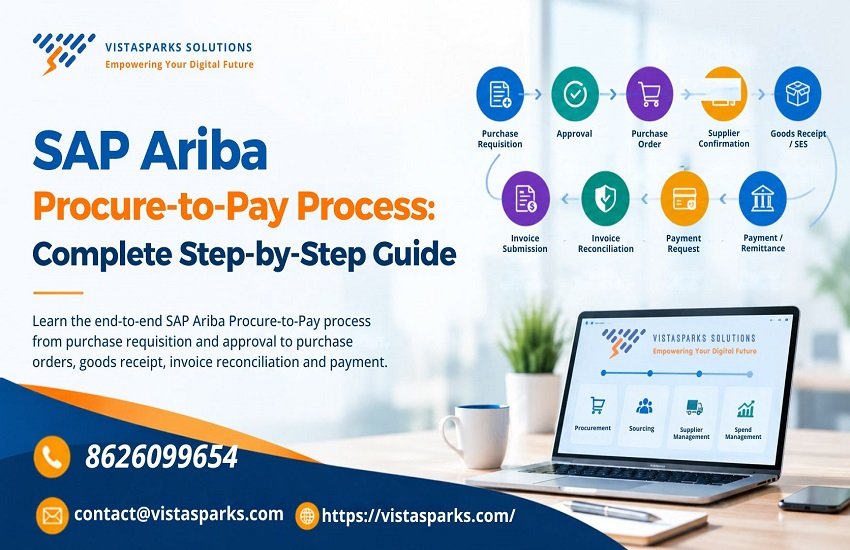
Quick answer: SAP Ariba Procure-to-Pay is the complete buying cycle handled inside SAP Ariba. It starts with an employee’s purchase requisition, moves through approval, purchase order, supplier confirmation, goods receipt or service entry, invoice matching and ends with payment and remittance.
Every company buys something. Laptops, raw material, consulting hours, even office chairs. What separates a well-run business from a messy one is how that buying is handled from the first request to the final payment, and in SAP Ariba that whole journey is called Procure to Pay, or P2P.
If you are thinking about SAP Ariba Training, this is the best place to start. Most Ariba projects, interviews and real support tickets come back to this one flow. In this guide from Vistasparks Solutions, we walk through each stage of the SAP Ariba P2P process, show a worked example, cover the problems people actually run into, and answer the questions people type into Google.
Table Of Content
Table of Contents
What Is Procure to Pay in SAP Ariba?
Procure to pay covers everything a company does to buy something and pay for it. It brings together procurement (raising the need), purchasing (ordering from a supplier), receiving (confirming delivery), invoicing (the supplier’s bill) and payment. Approvals and supplier collaboration sit across all of it.
SAP describes its own procure-to-pay applications, sold as SAP Ariba Buying and Invoicing, as a way to improve visibility, cost control and compliance across procurement, along with supplier collaboration. You can read SAP’s own overview on the SAP procure-to-pay page.
It helps to split the flow into two halves. The first half, procure to receipt, covers the requisition, approval, purchase order, supplier fulfillment and receiving. The second half, invoice to pay, covers invoice submission, matching, reconciliation, the payment request and remittance. Once you see it as two halves, the whole thing feels a lot less heavy.
SAP Ariba Procurement Process Flow at a Glance
Here is the full SAP Ariba procurement workflow in one table. Keep it in mind, because every section below expands one row.
| Half | Step | What happens |
|---|---|---|
| Procure to Receipt | 1. Purchase Requisition | An employee asks for goods or services |
| Procure to Receipt | 2. Approval | The right people review and approve the request |
| Procure to Receipt | 3. Purchase Order | A formal order is created and sent to the supplier |
| Procure to Receipt | 4. Supplier Confirmation | The supplier accepts the order and arranges delivery |
| Procure to Receipt | 5. Goods Receipt or Service Entry Sheet | The buyer confirms what actually arrived |
| Invoice to Pay | 6. Invoice Submission | The supplier sends the bill |
| Invoice to Pay | 7. Invoice Reconciliation | The invoice is matched with the order and the receipt |
| Invoice to Pay | 8. Payment and Remittance | A payment request goes to the ERP and the supplier gets paid |
How Does the SAP Ariba P2P Process Work?
Step 1: Purchase Requisition in SAP Ariba
A SAP Ariba purchase requisition is an internal request. It says “I need this, please approve it.” No supplier has been contacted yet and no money has been committed.
The requester picks an item, adds the quantity, delivery date, cost center and any other required details, then submits it. Many companies use SAP Ariba Guided Buying here, because it walks casual users through the choices instead of handing them a long form.
There are two common types. A catalog requisition is for items already listed with agreed prices from approved suppliers, like standard laptops or stationery. A non-catalog requisition is for anything outside the catalog, such as a one-time service. Because the supplier and price are not pre-agreed, non-catalog requests usually need more detail and often more approval. SAP Learning has a useful walkthrough of requisition statuses in its SAP Ariba procurement overview course.
Step 2: Approval Workflow
After submission, the requisition goes through the approval workflow. Companies usually build the rules around the amount, the cost center, the commodity and sometimes the requester’s level. A small request might need one manager. A large one might pass through a department head, finance and a procurement lead. If an approver rejects it, the requester can correct it and send it again.
It is easy to treat approvals as a formality, but they shape the whole process. The rules decide how fast a request moves and how tightly spending is controlled, so they are worth understanding early.
Step 3: Purchase Order in SAP Ariba
Once approved, the system creates a SAP Ariba purchase order. Depending on configuration, one requisition can produce one or several purchase orders, for example when items have to come from different suppliers. This is the SAP Ariba PR to PO process, and it is the moment an internal request becomes a formal commitment to a supplier.
A frequent search is the difference between purchase requisition and purchase order in SAP Ariba. This table answers it.
| Purchase Requisition | Purchase Order |
|---|---|
| Internal request | Document sent to the supplier |
| Created by the requester | Generated after approval |
| Needs internal approval | Represents the confirmed order |
| Shows a purchasing need | Shows what the company agreed to buy |
Orders can also be changed or cancelled after they are sent, depending on their status and what the supplier has already done. Changes are passed to the supplier so both sides stay on the same page.
Step 4: Supplier Confirmation and Fulfillment
When the order reaches the supplier, they review it, confirm it and often send a shipping notice so the buyer knows what is coming and when. This exchange runs through the SAP Business Network, the shared space where buyers and suppliers connect. Since both parties look at the same order, there is far less back and forth over email and phone.
Step 5: Goods Receipt and Service Entry Sheet
A goods receipt is the buyer’s confirmation that physical items arrived and in what quantity. For services there is nothing to unpack, so the buyer records the work using a service entry sheet, usually called an SES. Think of consultants, maintenance contracts or cleaning services. The purpose is identical in both cases: proof that what was ordered was really delivered. That proof is what the invoice gets checked against later.

Step 6: Invoice Processing in SAP Ariba
Now the supplier bills the company. SAP Ariba invoice processing deals with two main types. PO based invoices refer to an existing purchase order, while non PO invoices cover spend that did not go through one. Every invoice is validated when it arrives. Clean ones move ahead, and problem ones land in an exception queue for a person to review.
Step 7: Invoice Reconciliation
This step trips up many beginners, so it gets a section of its own.
SAP Ariba invoice reconciliation is the process of matching the supplier’s invoice against the purchase order and the receipt, then dealing with any differences. If everything lines up, the invoice moves on. If not, it stops for review.
The classic check here is called three way matching. It compares the purchase order (what was ordered and at what price), the goods receipt or service entry sheet (what was received), and the invoice (what the supplier is charging). All three should agree.
When they don’t, the usual causes are easy to recognize. If the invoice bills for 100 units but only 90 were received, you have a quantity mismatch, and the invoice waits until someone resolves it. If the invoice price is higher than the order price, you have a price mismatch, and someone must decide whether to accept it, reject it or ask for a corrected invoice. If the invoice arrives before anyone recorded the delivery, it sits and waits for the receipt. And if tax details or references are wrong, the supplier is normally asked to fix and resend.
This step protects the company from paying for things it never received, or paying more than it agreed to.
Step 8: Payment Request and Remittance
After the invoice is reconciled and approved, a payment request is created and sent to the company’s ERP, where the payment itself is made. Remittance information then comes back so buyer and supplier can both see the payment status. From first requisition to final remittance, everything is tracked in one place.
SAP Ariba Guided Buying in the P2P Process
Guided Buying is the friendly front door of procurement. Instead of expecting every employee to learn purchasing rules, it guides them through simple choices, shows catalog items and sends the request down the right approval path. From there the usual flow continues with approval, order, fulfillment, receipt and invoice matching. For companies with many occasional buyers, the aim is simple: make the compliant way of buying the easy way.
Role of SAP Business Network in SAP Ariba P2P
The SAP Business Network connects buyer and supplier. Suppliers use it to receive purchase orders, send confirmations and shipping notices, submit invoices and track document status. Buyers get faster answers and fewer follow-up emails. Suppliers get a clear view of what has been ordered and what is still unpaid.
SAP Ariba S/4HANA Integration for Procure to Pay
Many larger companies run their finance and core operations on SAP S/4HANA. SAP Ariba S/4HANA integration connects the cloud procurement process to that ERP. At a high level, the two systems exchange master data such as suppliers and cost centers, plus purchase orders, goods receipts, invoices and payment information.
The exact setup depends on the company, the version and the integration method. That is one area where you should follow current SAP documentation and your project design instead of copying a generic configuration from a blog, including this one.
SAP Ariba Procure to Pay Example: Buying 100 Laptops
A growing company hires 100 new employees and needs laptops for all of them.
The IT manager raises a purchase requisition for 100 laptops from the approved catalog. Because of the total amount, the request goes to the department head and finance, and both approve it. The system then generates a purchase order and sends it to the supplier through the Business Network. The supplier confirms and shares a shipping notice with the expected delivery date.
The first shipment arrives with only 95 laptops. The receiving team counts them and records a goods receipt for 95. Meanwhile the supplier submits an invoice for 100. During reconciliation, the system compares the order (100), the receipt (95) and the invoice (100), and flags the mismatch.
Procurement contacts the supplier, who agrees to invoice 95 now and send the remaining 5 later. The corrected invoice passes reconciliation and is approved. A payment request goes to the ERP, the supplier is paid, and remittance details flow back into the system.
One small delivery gap shows why each step exists. Without the receipt, the company could have paid for five laptops that never showed up. Without approval, anyone could have ordered anything.
SAP Ariba P2P vs Traditional Procurement
| Area | Traditional Procurement | SAP Ariba P2P |
|---|---|---|
| Requisition | Email, paper or spreadsheet | Raised digitally in the system |
| Approval | Manual, often chased by phone | Configurable digital workflow |
| Purchase order | Created and sent by hand | Generated by the system |
| Supplier communication | Email and phone calls | Shared digital network |
| Invoice handling | Manual entry and checking | Digital processing and matching |
| Visibility | Limited and spread across people | Centralized status tracking |
We are not promising specific savings here. Results depend on the company, its processes and the quality of the implementation. What can be said safely is that a connected process gives better visibility, cleaner records and fewer manual handoffs.
Common SAP Ariba P2P Issues and How to Approach Them
Anyone working with SAP Ariba meets a few familiar problems sooner or later. A requisition stuck in approval is usually an unavailable approver or a rule that routes to the wrong person, so check the approval path first. A purchase order that never generates often points to missing data on the approved requisition, such as supplier or account details. If the order does not reach the supplier, look at the supplier’s Business Network setup and the transmission status. A missing goods receipt simply means nobody recorded the delivery, and it holds up invoice matching.
Invoice mismatches and reconciliation failures come down to comparing quantity, price and tax against the order and the receipt. A payment request that is not generated usually means the invoice was not fully approved or the ERP connection needs a check. And when data does not sync between systems, review the integration status and the master data first.
These are exactly the situations a good SAP Ariba Training Course should let you practice, because knowing the theory is one thing and fixing a stuck invoice on a deadline is another.
SAP Ariba P2P Interview Questions
If you are preparing for a job, expect questions like these.
- What is the SAP Ariba P2P process?
- What is the difference between a purchase requisition and a purchase order?
- How does the approval workflow work?
- What is invoice reconciliation, and why do invoices fail it?
- Explain three way matching with an example.
- What is the role of the SAP Business Network?
- How does SAP Ariba connect with SAP S/4HANA?
- What happens when goods arrive in partial quantities?
A short, clear answer with a simple example beats a memorized definition every time. The laptop scenario above works well for most of them.
How to Learn SAP Ariba Procure to Pay
There is no single right path, but a sensible order is to start with basic procurement concepts, learn the P2P flow the way we covered it here, practice each stage in a demo or training environment, and only then move on to integration and configuration.
SAP Ariba Online Training suits working professionals who cannot attend fixed classroom hours, because you can study around your job. A structured SAP Ariba Training Course should cover procurement, sourcing, supplier management, invoice handling, integration and real scenarios, not just slides. If you are comparing a SAP Ariba Training Online Course, check that it includes live practice and trainer support, and that it explains the full P2P cycle before jumping into configuration.
SAP Ariba Certification Training and Career Growth
SAP runs its own certification path for Ariba. As an example, the SAP Certified Implementation Consultant for SAP Ariba Procurement is described by SAP as an entry-level qualification, and at the time of writing it is a scenario based assessment. Exam formats, pass scores and subscription rules change, so always confirm current details on SAP’s official page before you plan your preparation.
SAP Ariba Certification Training helps you cover the areas the exam expects, and it also builds the practical understanding interviewers look for. An SAP Ariba Training Certification Course can be a useful step if you are moving into procurement technology. Still, a certificate alone does not make you job ready. Employers want to hear you explain how a requisition becomes a payment, and what to do when it gets stuck halfway.

Frequently Asked Questions About SAP Ariba Procure to Pay
What is SAP Ariba Procure to Pay?
It is the end-to-end process of buying goods and services on the SAP Ariba platform, from the first request to the final payment.
What are the steps in the SAP Ariba P2P process?
The main steps are purchase requisition, approval, purchase order, supplier confirmation, goods receipt or service entry sheet, invoice submission, invoice reconciliation and payment.
What is the difference between PR and PO in SAP Ariba?
A purchase requisition is an internal request that needs approval. A purchase order is the formal document sent to the supplier after approval.
What is invoice reconciliation in SAP Ariba?
It is the process of matching a supplier invoice against the purchase order and the receipt, and resolving any differences before payment.
What is 3-way matching in SAP Ariba?
It is a check that compares the purchase order, the goods receipt or service entry sheet, and the invoice to confirm all three agree.
What is SAP Ariba Guided Buying?
It is a guided purchasing experience that helps employees create requests easily and follow company buying rules without needing procurement expertise.
How does SAP Ariba integrate with SAP S/4HANA?
The systems exchange data such as master data, purchase orders, receipts, invoices and payment information. The exact method depends on the company’s setup.
What is SAP Business Network in SAP Ariba?
It is the online network where buyers and suppliers exchange orders, confirmations, shipping notices and invoices.
Is SAP Ariba P2P difficult to learn?
The logic is easy to follow once you see the full flow. The harder part is configuration and exception handling, which is best learned through practice.
Is SAP Ariba certification worth it?
It can support your profile, especially when combined with hands-on knowledge. Check SAP’s official certification pages for current details.
How long does SAP Ariba online training take?
It depends on the course, the trainer and the time you can give each week. Ask any provider for a clear syllabus and schedule before you join.
What skills do I need to learn SAP Ariba?
A basic understanding of procurement and business processes is enough to begin. Familiarity with SAP or other ERP systems helps but is not always required.
Final Thoughts
The SAP Ariba Procure to Pay process can look long on paper, but the logic is simple: ask, approve, order, receive, verify and pay. Once you understand why each step exists, the system starts to make sense.
If you want to build practical skills in procurement workflows, sourcing, supplier management, integration, configuration and real implementation scenarios, explore our SAP Ariba Training program at Vistasparks Solutions. Our team can help you choose between SAP Ariba Online Training, a full SAP Ariba Training Course or SAP Ariba Certification Training, based on where you are in your career. Whether you prefer a flexible SAP Ariba Training Online Course or an SAP Ariba Training Certification Course aimed at the exam, the goal is the same: you should be able to explain and handle the full P2P cycle on your own.
Ready to take the next step? Get in touch with Vistasparks Solutions today and start learning SAP Ariba the practical way.
Ready to take the next step?
Get in touch with Vistasparks Solutions today and start learning SAP Ariba the practical way.
Explore More SAP Training at Vistasparks Solutions
Once you understand the Procure-to-Pay cycle, you may want to build skills in other SAP areas. Here are related programs from Vistasparks Solutions.
